Don Figuerres
  • Home
  • About
  • Skills
  • Experiences
  • Projects
  • More
    Accomplishments Education Recent Posts
  • Posts
  • Dark Theme
    Light Theme Dark Theme System Theme
  • Posts
  • Cloud
    • AWS
      • Hosting a Website Using AWS S3
  • Hardware
    • Lenovo Swap Fn and Ctrl Keys
  • Programming Tutorials
    • Factorial
    • Fibonacci Sequence
  • Software Development
    • Common Tools for Software Development
    • Java
      • Java Performance Testing Using Zerocode
    • Tmux Settings
    • VS Code
      • Python Test Debugging Does Not Hit Breakpoint
  • Version Control
    • Git
      • Changing Committer, Author, and Email in Git
      • Git Connection Errors During Cloning
      • Global gitignore File
      • Multiple SSH Keys
  • Virtualbox
    • CentOS 7 VirtualBox 5.2 Error
  • WSL2
    • Dark Theme in WSL2 GUI
Hero Image
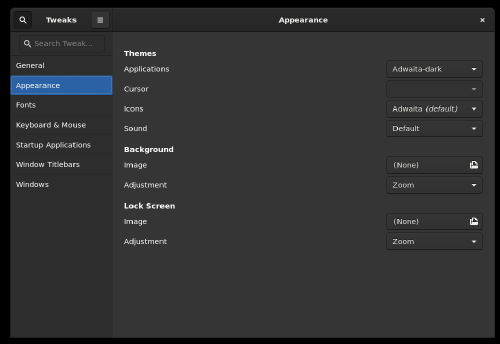
Dark Theme in WSL2 GUI

Running GUI apps in WSL2 has finally been made easier in more recent versions of Windows 11 and Windows 10 with WSL2. If you’re like me, who use Windows as a daily driver for software development, you know that this makes life a bit easier. Before the recent updates, you had to install an X Server and that is what you set as your display in your WSL2 environment - a bit old school. But now, WSL2 is better integrated with the host Windows environment that you no longer need to install an X Server for Linux GUI apps to work.
Tuesday, August 9, 2022 Read
Navigation
  • About
  • Skills
  • Experiences
  • Projects
  • Accomplishments
  • Education
  • Recent Posts
Contact me:
  • lyndonfiguerres@gmail.com

Toha Theme Logo Toha
Copyright © 2021-2022. donfiguerres.com. All rights reserved.
Powered by Hugo Logo